
SharePoint Online has long been a cornerstone of Microsoft’s content management and collaboration offerings. With the recent announcements of AI-driven innovations such as Copilot and integrations with Viva Amplify, the platform is evolving to meet the needs of modern organizations. In this comprehensive article, we will explore these cutting-edge features, discuss their benefits, and analyze the impact they will have on the SharePoint ecosystem.

The Power of AI: SharePoint Copilot
Microsoft has introduced Copilot, an AI-driven feature integrated into SharePoint, aiming to revolutionize the content creation process.
Simplifying Site Creation
SharePoint Copilot simplifies site creation by leveraging AI technology and the user’s business data stored in Microsoft Graph. With a brief prompt, Copilot generates a starter site containing relevant information from across the organization. Users can then work alongside Copilot to refine the site, ensuring it meets their requirements and aligns with their organization’s brand.
Transforming Existing Content
In addition to creating new sites, Copilot assists in transforming existing content into visually appealing and engaging SharePoint pages. As a web design partner, Copilot rewrites text, iterates on navigation and look-and-feel settings, and leverages SharePoint’s web design visuals to create captivating sites that draw in audiences and boost interaction.
The New SharePoint Start Experience
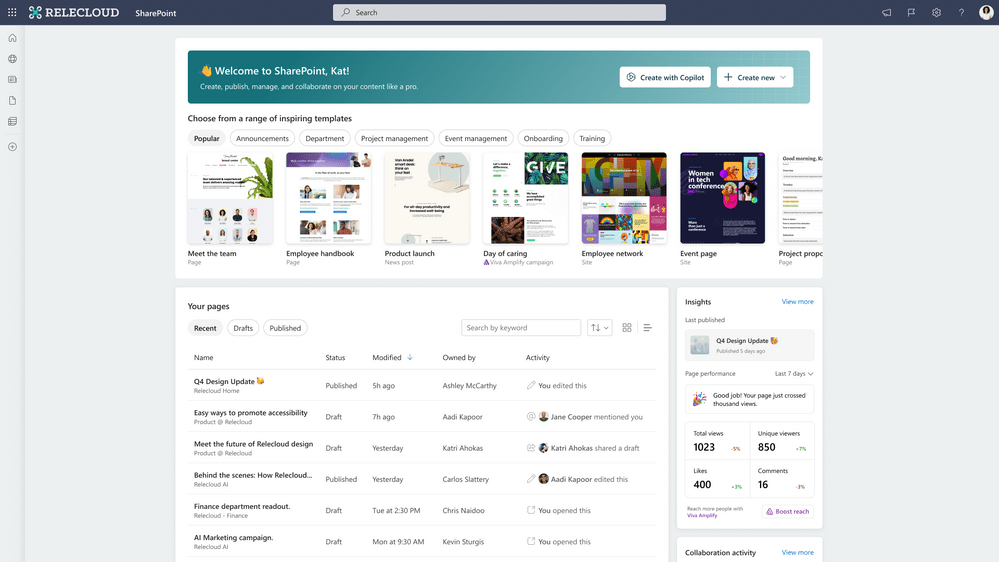
The new SharePoint start experience aims to make site and page creation easier and more inspiring than ever before.
Streamlined Site and Page Creation
The updated start page offers a range of templates tailored to common team and organizational communication needs, such as newsletters, event announcements, and project tracking sites. Users can quickly manage their personal pages, view popular news posts, and access analytics on engagement, making the SharePoint start experience more user-friendly and efficient.
Personalized Content Management
The start experience also facilitates personalized content management, allowing users to create and manage pages tailored to their needs. For instance, creating a video page for a recent town hall recording is as simple as selecting the appropriate template and uploading the video, streamlining the content creation process.
Collaboration Made Easy with Coauthoring
SharePoint’s coauthoring capabilities aim to enhance collaboration among employees and departments, making it easier for teams to work together in real-time.
Real-time Editing and Sharing
Powered by the Microsoft Fluid framework, the same technology behind Microsoft Loop, SharePoint’s coauthoring feature allows editors to work together on the same page canvas in real-time. This enhanced collaboration simplifies the sharing of pages, ensuring all team members can access and contribute to the content.
Section Commenting and Approval
SharePoint has also introduced section commenting, enabling authors to review and approve content directly inline with the page. This feature further streamlines collaboration, ensuring that feedback and revisions are easily accessible and incorporated into the final content.
Designing Engaging Digital Experiences
Microsoft is committed to enhancing the visual capabilities of SharePoint, empowering content authors to create engaging digital experiences for their users.
Bold, Sophisticated Visuals
Leveraging the Microsoft Fluent Design System, SharePoint now offers bolder and more sophisticated design elements, enabling users to create sites and pages that feel natural alongside other Microsoft 365 experiences. These improvements encompass all aspects of web design, including branding, theming, typography, fonts, layout, images, video, animations, and motion.
The SharePoint Brand Center
The new Brand Center in SharePoint allows organizations to maintain brand consistency across their sites and subsidiaries. Users can specify fonts, colors, logos, and other design elements that reflect their organization’s brand, while SharePoint enforces guidelines to ensure a cohesive visual identity.

Advanced Image and Video Editing Features
SharePoint’s new visual experience provides advanced image and video editing features to create compelling multimedia content.
Image Editor and Stream Web Part
The new image editor allows users to crop images into different shapes, adjust colors, add text overlays, and apply filters for eye-catching visuals. The updated Stream web part facilitates embedding single or multiple videos with folders and playlists directly into SharePoint pages, ensuring a seamless multimedia experience.
Video Page Templates
SharePoint now offers dedicated video page templates, allowing users to create professional-looking pages for their video content. Users can create video pages directly from the Stream video player, providing a unified platform for managing and sharing multimedia content.
Enhancing SharePoint Accessibility
To maximize the impact of SharePoint content, Microsoft has focused on improving its accessibility and discoverability across various tools and workflows.
Integration with Outlook, Teams, and Viva
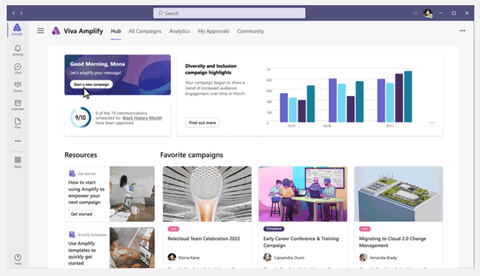
SharePoint’s integration with Outlook allows users to preview and send full news posts as emails, while unified page analytics offer insights into engagement across both platforms. In Teams, SharePoint pages can be connected to channels, enabling users to access and collaborate on content within the app. Viva Amplify, a component of Microsoft Viva, further extends SharePoint’s reach, allowing users to publish content across multiple channels and distribution groups for maximum visibility and engagement.

SharePoint in Viva Amplify
Viva Amplify is a game-changing tool for communicating with audiences through Microsoft 365. With advanced analytics and campaign management features, users can seamlessly integrate SharePoint content with other Microsoft 365 communication channels, ensuring their content reaches the right audiences and generates maximum impact.
The Impact on SharePoint Developers
As SharePoint evolves to meet the needs of modern organizations, developers play a crucial role in customizing the platform to cater to specific requirements.
SharePoint Framework and Microsoft Graph
Developer models such as SharePoint Framework (for templating, UX, and plug-ins) and Microsoft Graph (for data access) are continuously maintained and improved to ensure SharePoint remains a flexible and customizable platform.
Upcoming Enhancements
SharePoint Framework 1.17 is set to provide improvements to web part configurations, new capabilities for Viva Connections cards, and support for SharePoint Framework solutions in Outlook and the Microsoft 365 app. Additionally, the SharePoint Pages API is expected to move from Beta to GA in May 2023, further expanding the possibilities for developers.
The Pros and Cons of SharePoint Innovations
While these innovations hold great potential for transforming the SharePoint experience, they also present challenges for organizations to navigate.
Increased Adoption and Productivity
Making tools more accessible and user-friendly can drive adoption and productivity, as employees become more comfortable creating content and collaborating within the platform. This can lead to increased satisfaction, collaboration, and overall effectiveness within the organization.
Potential Challenges and Sprawl
However, a more accessible SharePoint may also result in duplicate sites, misaligned branding, or content that does not align with the organization’s mission and purpose. Without proper governance policies and visibility, a sudden increase in site volume and content creation can lead to sprawl, negatively impacting both end users and IT teams.
Conclusion: The Future of SharePoint
The integration of Copilot, Viva Amplify, and other AI-driven innovations signify a new era for SharePoint Online. As the platform evolves to meet the needs of modern organizations, it is essential for IT teams to adapt and harness these new capabilities to drive adoption, productivity, and collaboration. By embracing these changes, organizations can unlock the full potential of SharePoint and transform their content creation and management processes.
Links:
SharePoint’s latest innovations: Copilot, a brand new look, and more
 The Technology, The CIO Life and Me
Leave a reply to Explore the Microsoft 365 Conference in Las Vegas Through Video Highlights – The Technology, The CIO Life and Me Cancel reply